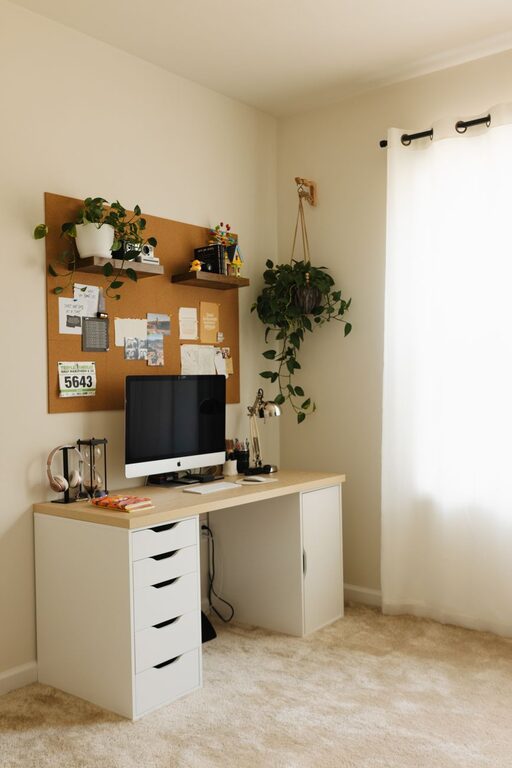
Creating a home office that feels both cozy and productive can transform your work-from-home experience. A well-designed space helps you focus, stay organized, and maintain a positive mindset throughout the day. Whether you have a dedicated room or a small corner, these tips will guide you in setting up a home office that promotes comfort and efficiency.
Choose the Right Location
Your workspace location plays a crucial role in your productivity and comfort.
– Natural Light: Select a spot near a window to take advantage of natural light. Sunlight can improve mood and energy levels.
– Quiet Area: Find a place with minimal distractions to help maintain focus.
– Space Availability: Ensure there’s enough room for your desk, chair, and storage without feeling cramped.
Invest in Ergonomic Furniture
Comfort is key to working productively for long hours.
– Ergonomic Chair: Choose a chair with adjustable height, lumbar support, and comfortable cushioning.
– Desk Height: Your desk should allow you to work with your arms at a 90-degree angle to reduce strain.
– Monitor Position: Place your screen at eye level to prevent neck and eye strain.
Personalize Your Space
Adding personal touches creates a warm and inviting atmosphere.
– Colors: Use calming colors like soft blues, greens, or neutrals to create a peaceful environment.
– Plants: Incorporate indoor plants to freshen the air and add a natural feel.
– Decor: Photos, artwork, or inspirational quotes can motivate you and make the area uniquely yours.
Organize for Efficiency
A tidy space encourages a tidy mind.
– Storage Solutions: Use shelves, drawers, and filing cabinets to keep documents and supplies organized.
– Desk Accessories: Utilize trays, pen holders, and cable organizers to reduce clutter.
– Digital Organization: Keep your computer files and emails sorted to avoid overwhelm.
Optimize Lighting
Proper lighting reduces eye strain and keeps you alert.
– Layered Lighting: Combine natural light with task lighting (desk lamps) and ambient lighting (overhead lights).
– Adjustable Lamps: A lamp with adjustable brightness helps customize lighting based on your needs.
– Avoid Glare: Position screens and lights to reduce reflective glare.
Minimize Distractions
Design your office to help you stay on task.
– Noise Control: Use noise-canceling headphones or white noise machines if your surroundings are noisy.
– Limit Clutter: Keep only work-related items on your desk to avoid unnecessary distractions.
– Set Boundaries: If you share your home, communicate work hours to household members.
Incorporate Comfort Elements
Small comforts can boost productivity and reduce stress.
– Soft Textiles: Add a cozy rug, cushions, or a throw blanket.
– Temperature Control: Ensure the room is well-ventilated and maintain a comfortable temperature.
– Break Area: If possible, create a small space nearby to stretch or relax during breaks.
Use Technology Wisely
Leverage technology to enhance your workflow.
– Reliable Internet: Ensure you have a fast and stable internet connection.
– Efficient Tools: Use apps and software that streamline your tasks, like calendars, to-do lists, and collaboration platforms.
– Cable Management: Tidy cables with clips or sleeves to keep the space orderly.
Establish a Routine
Your environment supports habits that improve productivity.
– Start and End Times: Keep consistent work hours to maintain balance.
– Regular Breaks: Take short breaks to avoid burnout and refresh your mind.
– Daily Setup: Begin by organizing your desk and planning your tasks each day.
Final Thoughts
Designing a cozy and productive home office is about balancing comfort and functionality. With thoughtful choices in location, furniture, lighting, and organization, your workspace can become a place where you enjoy spending time and accomplish your goals effectively. Remember, the best office is one that suits your personal needs and helps you thrive.
About the Author